Sooner or later, someone on your team says, "We need to chunk our content for AI." It sounds technical and urgent, and few people can explain it.
Content chunking is the practice of breaking information into small, self-contained units that make sense on their own.
Writers use it to help people scan and understand. Search and AI systems use their own version of it to split a page into passages they can pull out and quote.
The advice goes like this: split your pages into bite-sized pieces so AI search can use them. Some agencies sell it as a must-do for answer engine optimization. Others call it a myth.
Both sides are using one word for different things. That is why the advice sounds so sure and so confusing at the same time.
In this guide, we will discuss what Google says, what the research shows, and which habits are worth keeping. You will also get a simple test you can run on any page in a few minutes.
The Three Meanings of Content Chunking
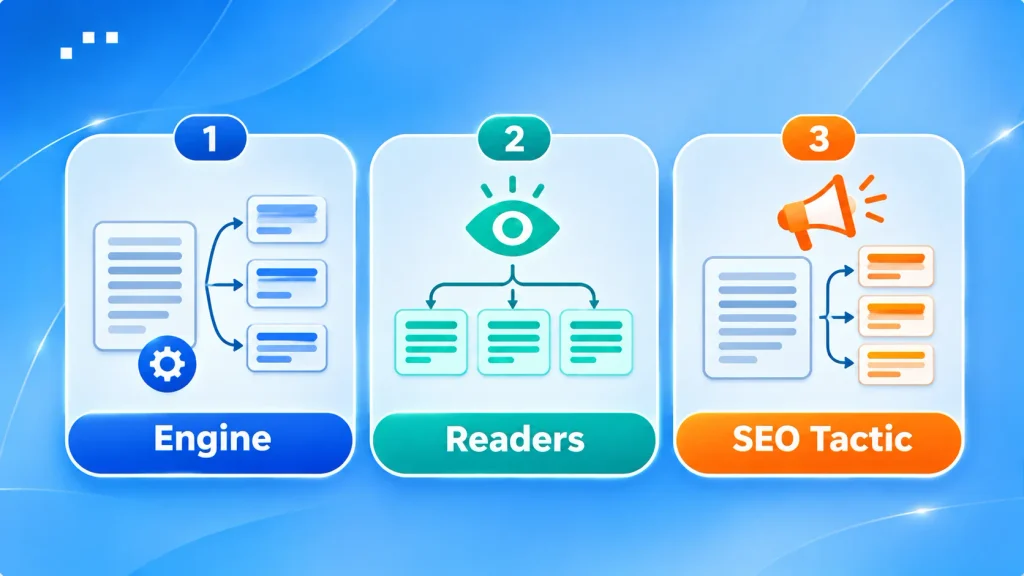
- Chunking by the engine. AI search tools split your page into passages behind the scenes before they pick what to use in an answer. You don't control where the cuts fall.
- Chunking for readers. In UX, it means grouping information into meaningful, visually distinct units, as the Nielsen Norman Group describes it. This idea is decades old.
- Chunking as an SEO tactic. This is the newer advice to pre-split your pages into short, bite-sized pieces so AI search can use them. It often shows up in generative engine optimization playbooks, and it is the part people argue about.
The Short Version
- Chunking for readers: yes. Good writers already do it.
- Chunking as a trick for AI visibility: Google says you don't need it, and the evidence for it is thin.
- What is worth doing: write each section so it still makes sense when someone lifts it out of the page. A simple test for that comes later in this article.
What Google Says About Content Chunking
Google's AI optimization guide, last updated on July 10, 2026, answers this head-on. It says: "There's no requirement to break your content into tiny pieces for AI to better understand it."
The same guide says shorter or longer pages can both work, depending on your audience and subject. It also says there is no ideal page length, and no need to write in a special way just for generative AI search.
Google's Danny Sullivan went further on the Search Off the Record podcast in January 2026. Asked about advice to turn content into bite-sized chunks because LLMs like them, he said: "We don't want you to do that."
He also said Google doesn't want you to create two versions of your content, one for the LLM and one for the internet, as Search Engine Roundtable reported.
What That Means in Plain Words
- Google does not ask for pages chopped into tiny pieces.
- Google does not want an AI-only version of your page.
- Neither source tells you to write messy, hard-to-read pages. The target is the trick, not clear writing.
How AI Systems Chunk Your Pages Behind the Scenes

Most AI answer tools use a setup called retrieval-augmented generation, or RAG. The system splits documents into pieces, stores them in an index, and pulls the pieces closest to a question. Then it writes an answer from those pieces.
That splitting step is what engineers call chunking. It happens on the engine's side, and there are several ways to do it:
- Fixed-size: cut every set number of tokens, often with a little overlap.
- Recursive: split by section, then paragraph, then sentence, until each piece fits a size limit.
- Document-aware: split at headings, lists, and tables.
- Semantic: split where the topic changes.
- LLM-guided: ask a model to decide where each idea starts and ends.
Each system picks its own method, and Google has not published how it does it. You can't write to a chunk size you can't see.
There Is No Single Best Chunk Size
NVIDIA tested fixed chunks from 128 to 2,048 tokens, plus page-level and section-level splits, across five document sets. Page-level chunking scored best on average (0.648). The best size still changed by dataset.
Factual, look-up style questions did best with chunks of 256 to 512 tokens. Complex analytical questions did better with 1,024 tokens or whole pages. Tiny 128-token chunks scored worst on one dataset (0.421).
One caution: NVIDIA tested its own pipeline on PDFs, not web pages and not Google. The lesson is that the best size depends on the engine and the question. Anyone quoting an "ideal chunk size" for web content is guessing.
Why Query Fan-Out Changes the Picture
AI search often turns one question into several related searches. Google calls this query fan-out.
Each of those searches can pull a different passage from a different page. In our reading, that is the real reason to write clear, specific sections: each one has its own chance to match a narrow question.
What the Research Shows, and What It Doesn't

We could not find a controlled study showing that pre-splitting a web page raises its visibility in Google's AI features. What exists are small tests and expert opinions. Here are the two that matter most.
Chris Green's Format Test
Chris Green rewrote three articles in three styles: dense prose, structured text with headings and lists, and question-and-answer. He split each one four ways, then compared the pieces to five search queries using vector similarity.
Q&A scored highest in every scenario. Dense prose scored lowest. Structured text came close to Q&A for queries that weren't phrased as questions.
Green is upfront about the limits. The test was small, vector similarity is not ranking, and Google's real method is unknown.
Our reading: direct answers and clear structure help a retrieval step find the right piece. That is a point about clarity, not about cutting pages into bits.
The Counterview From Mike King
Mike King of iPullRank argues that Danny Sullivan's advice misreads how these systems work. In his view, AI systems retrieve passages and not whole pages, so self-contained content is easier to retrieve.
His line is worth quoting: "Chunking and creating content for users are not mutually exclusive."
Where the Two Sides Agree
Both camps want clear, useful writing for people. The real disagreement is about extra work done only for machines.
That gives you a practical path. Skip the machine-only work, and keep the habits that help people and retrieval systems alike.
Content Chunking Myths vs. Facts
Most of the confusion comes from a few claims that get repeated until they sound true. Here is how each one holds up:
| The Claim | What Holds Up |
| You must split pages into small pieces to show up in AI answers. | Google's guide says there is no requirement to break content into tiny pieces for AI. |
| Google penalizes chunked content. | We found no Google statement saying it demotes clear, well-organized pages. Its objection is to extra work and AI-only versions of a page. |
| The ideal chunk is 100 to 300 words, or 500 tokens. | Google gives no such number. NVIDIA's test shows the best size shifts with the question and the engine. |
| Miller's "7 plus or minus 2" means every list needs seven items. | NN/g says people misread it as a hard limit. Other researchers have proposed a range of three to six. |
| Chunking is a new invention for AI search. | The reader-focused version is decades old. Only the SEO tactic is new. |
| Q&A formatting always wins. | In Chris Green's small test, Q&A scored highest on vector similarity. That is not the same as ranking. |
Part of the confusion comes from mixing up GEO and traditional SEO, which share goals but not every tactic.
The Lift-Out Test: Write Sections That Stand Alone

You can't control where an engine cuts your page. You can control whether each section survives the cut.
So skip the word counts. Chunk by idea instead: one idea per section, and every section readable on its own. This simple test shows whether yours are.
How to Run the Test
Copy one section, heading and all, into a blank document. Read it cold, as if you had never seen the rest of the page. Then ask:
- Does the heading name the question the section answers? "Pricing" is vague. "How Much Does a Site Audit Cost?" is clear.
- Does the first sentence give the answer? Readers and retrieval systems both reward an answer up front.
- Are there dangling words? Watch for "this," "it," "the tool," and "as mentioned above." Name the thing instead.
- Does the section carry its own facts? Names, numbers, and sources should sit inside it, not in the section before.
- Is it one idea? If it holds two, split it. If it is one stray sentence, fold it into its neighbor.
A Quick Before and After
Before (needs the rest of the page): "Once that's done, it takes about ten minutes. The tool handles the rest."
After (stands alone): "Once you add the redirect, the update takes about ten minutes. Your CMS handles the rest."
The fix costs a few words. It also helps the reader who lands halfway down the page from a link.
What the Test Is and Isn't
This is an editing habit, not a proven ranking formula. It improves clarity for people first, which is the one thing Google and its critics agree on.
A section that stands alone is also the right place to show who said what and why readers can trust you. That matters even more when you are building authority without backlinks.
What to Skip When People Tell You to Chunk
Some "chunking" advice adds work and no value. Skip these:
- AI-only versions of your page. Google's Danny Sullivan said plainly that you shouldn't make one version for the LLM and one for people.
- Word or token targets for every section. Google doesn't publish one, and tests show the best size changes with the question.
- Seven items in every list. Use as many items as the content needs.
- AI-only files. Google's guide says you don't need new machine-readable files, AI text files, or Markdown to appear in Google Search. That includes an llms.txt file, which Google Search doesn't use.
- Many thin pages for one topic. Splitting a single topic into a page per question can leave each page with too little to say.
- A forced FAQ under every section. Use Q&A where people really ask the question.
- Markup as a shortcut. Schema markup describes a page well, but it can't fix an unclear section.
- Rewriting pages that already work. If a page ranks and reads well, leave it alone.
Should You Chunk Your Content? A Quick Decision Guide

Use your situation to decide. Most pages need an edit for clarity, not a rebuild.
| Your Situation | What to Do |
| A long page with big, unbroken walls of text | Break it up by idea, with clear headings. Readers need this whether or not AI exists. |
| Sections that lean on "as mentioned above" | Run the lift-out test and name the things you refer to. |
| A page that ranks, reads well, and has scannable sections | Leave it alone. |
| A plan to build a second, AI-only version of a page | Skip it. Google says it doesn't want that. |
| Your own chatbot or site search built on your content | Chunking is a real design choice here. You set the rules, so test sizes against your own questions. |
| A long guide that covers one complex topic | Keep related ideas together. Cutting them into fragments can strip out the context each one needs. |
The own-chatbot row is the one place where chunk size is a setting you control. For a public web page, you can only control how clearly you write.
Most of these calls come down to a few AEO and GEO concepts: answer the question first, keep one idea per section, and show your sources.
How to Check Whether Your Edits Helped
Google's guide points to the Generative AI performance report in Search Console. It shows how your content does in generative AI features on Google Search and Discover.
You can't see how an engine split your page. So judge the edit by results, and keep the test clean:
- Pick a handful of pages. Choose ones you plan to edit anyway.
- Record a baseline. Save the Search Console numbers for a fixed period before you touch anything.
- Edit one thing. Use the lift-out test and change nothing else, so you know what caused any shift.
- Wait, then compare. Check the same length of time afterward, and allow for seasonal swings.
- Look for a pattern. One page moving proves little. The same shift across several pages tells you more.
Before you read any numbers, it helps to know how SEO works, so you don't credit one edit for a seasonal swing.
Final Word
Content chunking is two different things. One is a process that search engines run on your page, which you can't control. The other is a writing habit, which you can.
Google says you don't need to split pages into tiny pieces. Experts argue about the edges, but they agree on clear, useful writing for people.
So write one idea per section, run the lift-out test, and skip the rest.
If you want a second pair of eyes on your pages, Notionhive's AEO service reviews how clearly your content answers real questions.
Content Chunking FAQs
Does Content Chunking Help SEO?
Clear structure helps readers, and that helps your pages overall. Google says it has no requirement for tiny pieces, and we found no controlled study proving that pre-chunking raises AI visibility.
Does Google Penalize Chunked Content?
We found no Google statement saying so. Google's objection is to extra work for machines and to separate AI-only versions of a page.
How Long Should a Content Chunk Be?
There is no official number. In NVIDIA's test, factual questions did best with 256 to 512 tokens, while complex ones did better with 1,024 tokens or whole pages. For a web page, aim for one idea per section and let it run as long as that idea needs.
What Is Semantic Chunking?
It is an engine-side method that splits text where the topic changes, not at a fixed length. You can help it by keeping one idea per section.
Is Content Chunking the Same as Passage Ranking?
No. Google announced passage ranking in 2020 so it could weigh a specific passage on a page as an extra ranking factor. As Search Engine Journal reported at the time, Danny Sullivan said it did not mean Google would index passages separately, and that site owners needed no special preparation.
Where Does Chunking Fit in GEO and AEO?
It is one small idea inside a larger shift in how people find answers. AEO, GEO, and SXO all describe parts of that shift, and chunking only touches on how clearly you write each section.

About Author
Tanzim Sarwar TazTanzim Sarwar Taz is a content writer with 7+ years of experience creating in-depth content on SEO, technology, web development trends, and AI-driven search. His work focuses on emerging topics such as AEO, GEO, search experience optimization, artificial intelligence, and modern web technologies, delivering practical insights backed by research and industry developments.