An llms.txt file is a plain Markdown file at the root of your website (yourdomain.com/llms.txt). It gives AI tools a short summary of your site and a hand-picked list of links to your most useful pages.
Jeremy Howard of Answer.AI and fast.ai proposed the idea in 2024 so AI agents could use a website without wading through navigation, ads, and scripts. Think of it as a reading list for AI agents, not a rulebook. It doesn't allow or block anything.
Here is the short version:
- What it is: a Markdown index of your best pages, each with a one-line description.
- Who reads it: AI agents and coding tools that visit a site for a user. Not Google's ranking systems.
- Does it help SEO? There's no evidence that it does. Google says it makes no difference.
- Who should bother: mainly documentation, API, and software sites. For most other sites, it's optional.
- Effort: low. A small site can publish one in a single sitting.
People still publish it a lot. Ahrefs found that 28% of the 137,210 domains in its analytics tool have one, though it warns that's an upper bound because its users skew technical. No major AI platform has promised to read the file.
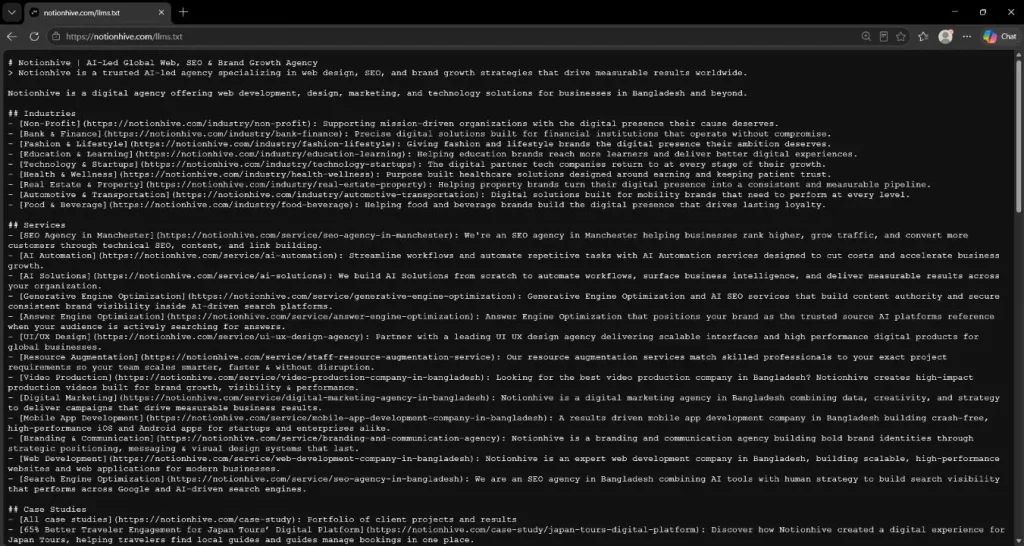
At Notionhive, we publish our own llms.txt (you can see it at notionhive.com/llms.txt) alongside a sourced AI instructions page, and we've set one up for a client, too. That hands-on work is why this guide focuses on what to include, what to leave out, and whether the file is worth your time.
What Does an llms.txt File Look Like?

An llms.txt file follows a simple order, set out in the llmstxt.org spec:
- An H1 with your site or project name. This is the only required part.
- A blockquote with a short summary of what the site is.
- Optional paragraphs or lists with extra details (no headings).
- H2 sections that hold lists of links. Each item is [Name](url), with an optional colon and a short note.
Here is a made-up example for a small interior design studio:
# Brightline Interiors

> Brightline Interiors is an interior design studio. We design and fit out homes and small offices, and publish starting prices for every service.

Important notes:

- Prices exclude tax.

- We don't offer online-only design services.

## Services

- [Home interior design](https://example.com/services/home): What's included, our process and typical timeline

- [Office fit-out](https://example.com/services/office): Packages for small offices

## Pricing and policies

- [Pricing](https://example.com/pricing): Starting prices for each service

- [Terms and refunds](https://example.com/terms): Payment schedule and cancellations

## Company

- [About](https://example.com/about): Who we are and who does the work

- [Contact](https://example.com/contact): Studio address, phone and opening hours

## Optional

- [Blog](https://example.com/blog): Design guides and project write-ups
By convention, the Optional section holds secondary links that an agent can skip when they need to read less.
What Changed in the v2 Spec
The spec was revised on 10 August 2026, and plenty of guides were written before that. Here's what's new:
- Files can live at any path. A file at /docs/llms.txt covers the pages under /docs/, and the most specific file wins. That helps if you only control one folder of a site.
- Markdown copies of pages have a standard way to be found. A page can point to its Markdown version (page.html.md or page.md) with rel="alternate" type="text/markdown", and to the file that covers it with rel="describedby". Both work as HTML <link> tags or an HTTP Link: header.
- The "Optional" section lost its special meaning. You can still use it, but nothing treats it as a command now.
The spec expects agents to read the file and then follow your links. So point those links at clean, readable pages, and keep the file small enough to fit in an agent's context. Adding the Markdown versions and link tags is usually a job for your web development team.
Does llms.txt Help SEO?

No. There's no evidence that an llms.txt file improves Google rankings, and Google says its Search systems ignore the file.
Google's guide to generative AI features lists llms.txt among the things you can skip. It also says that publishing one neither helps nor harms your visibility in Search, including AI Overviews and AI Mode.
Independent data points the same way:
| Source | What Was Checked | What It Found |
| Google Search Central (updated 10 Jul 2026) | Official guidance for AI features in Search | You don't need llms.txt or other special AI files. Google Search ignores them. |
| Ahrefs (15 Jun 2026) | Server logs for 137,210 domains in May 2026 | 28% of the domains had a valid file, and 97% of those files got zero requests. AI search bots made just 1.1% of the requests; the rest were received. |
| SE Ranking, reported by Search Engine Journal (Nov 2025) | About 300,000 domains: llms.txt vs how often AI answers cite them | No relationship. Removing llms.txt from their model made it more accurate. 10.13% of domains had the file. |
| OtterlyAI (Feb 2026) | One test site, 90 days of logs | 84 of 62,100+ AI bot visits (about 0.1%) hit the file, even though the homepage linked to it. |
| Semrush (Sep 2026) | Its sister site Search Engine Land, mid-Aug to late Oct 2025 | No visits to the file from the main AI crawlers it tracked, and no link to better AI results. |
Treat these as strong hints, not final proof. They count requests and correlations, not whether a bot read or used the file. Ahrefs says its own figures are a ceiling on real use, and its sample leans toward technical, SEO-aware sites. A correlation study can't rule out a small effect either.
One detail stands out. In the Ahrefs data, AI training crawlers fetched the file almost five times as often as AI search bots.
Ahrefs suggests that any effect would more likely come at the training stage than when an answer is generated. That's an educated guess, not something anyone has shown.
Treat these as strong hints, not final proof. They count requests and correlations, not whether a bot read or used the file. Ahrefs says its own figures are a ceiling on real use, and its sample leans toward technical, SEO-aware sites. A correlation study can't rule out a small effect either.
One detail stands out. In the Ahrefs data, AI training crawlers fetched the file almost five times as often as AI search bots. Ahrefs suggests that any effect would more likely come at the training stage than when an answer is generated. That's an educated guess, not something anyone has shown.
What Moves AI Visibility Instead?
Google's own advice for AI features is mostly classic SEO: original content, crawlable pages, and a clear brand identity. That last piece is what entity SEO in the AI era is about.
AI answers are also built from several related searches run at once, a process known as query fan-out. So, a thorough coverage of a topic gives your pages more ways to be found, even when the answer reaches people without a visit.
Why Does Chrome's Lighthouse Check for It, Then?
In late May 2026, Google told site owners they don't need llms.txt for Search. A few days later, Chrome added an llms.txt check to Lighthouse's experimental agentic browsing audits, according to Ahrefs.
The two moves fit together once you separate the audiences. Lighthouse calls the file an emerging convention and says agents may spend more time crawling a site without it.
But if your site has no file, the audit shows "not applicable". It only flags a server error. Lighthouse is also the tool many developers use to check Core Web Vitals on Next.js and Nuxt.js sites.
When asked about the contradiction, Google's John Mueller said llms.txt isn't made for search. He called it a "temporary crutch" for AI coding tools, reading developer docs. So search ranking and AI agents are two different audiences, and llms.txt is aimed only at the second.
llms.txt vs robots.txt
robots.txt sets rules for crawlers. llms.txt offers a reading list. Only robots.txt can ask a bot to stay out. Here's how the three files you'll hear about compare:
| robots.txt | sitemap.xml | llms.txt | |
| Main job | Tells crawlers which URLs they may crawl | Lists the pages you want search engines to find | Points AI agents to your best pages, with short notes |
| Who reads it | Search engines and AI crawlers that follow the rules | Search engines | AI tools that choose to read it. No major AI platform has committed to it. |
| Can it block access? | Yes, for bots that obey it | No | No |
| Format | Plain-text rules (User-agent, Allow, Disallow) | XML | Markdown |
| Affects Google Search? | Yes, it controls crawling | Yes, it helps discovery | No. Google ignores it. |
The spec says llms.txt complements robots.txt rather than replacing it. robots.txt is about what automated tools may access. llms.txt is information an agent uses on demand, when it needs to learn about a topic.
It doesn't replace a sitemap either. A sitemap lists every indexable page, while llms.txt is a short, curated list that can include outside pages.
The spec adds that sitemaps often lack Markdown versions of pages and can be too large for an AI tool to read in one go. Keep both, and get the basics right first: our technical SEO checklist walks through robots.txt and sitemap setup.
For a machine-readable description that search engines already read, structured data and schema markup are the established route.
Some guides claim llms.txt lets you control how AI uses your content, or whether it's used for training. It doesn't. The file has no allow or deny rules, so any opt-out happens in robots.txt.
How to Control AI Bots With robots.txt
Each AI company runs separate bots for training, search, and user requests. OpenAI's crawler documentation splits GPTBot (training) from OAI-SearchBot (ChatGPT search). It also notes that ChatGPT-User visits are triggered by people, so robots.txt rules may not apply.
Anthropic's help center lists three bots as well: ClaudeBot (training), Claude-SearchBot (search), and Claude-User (user requests).
Here's an example that opts out of training but stays open to AI search:
# Opt out of AI model training

User-agent: GPTBot

Disallow: /

User-agent: ClaudeBot

Disallow: /

# Stay eligible for AI search answers

User-agent: OAI-SearchBot

Allow: /

User-agent: Claude-SearchBot

Allow: /
Whether to block training bots is a business choice, not an SEO one. Check each company's page before you copy this, because bot names and rules change. Anthropic also says to repeat the rule on every subdomain you want to opt out.
Should You Create an llms.txt File?
Create one if you're a technology company or startup whose documentation or API people use alongside AI coding tools.
It's also worth a look if you're building a support bot or copilot on top of your own content, the kind of AI solution that needs a clean map of your pages. For most other sites, it's optional, and it shouldn't come before the basics.
| Your Site | Worth Doing? | Why |
| Developer docs, API reference, or help center for software | Yes | The spec says llms.txt is used most heavily for software documentation, and coding agents were among the main readers in the Ahrefs data. |
| A product your customers build with, using coding agents | Probably | A clean index helps the agent find the right pages fast. |
| Service business, local business or online store | Optional | No ranking benefit. It's cheap, but page quality and crawlability return more. |
| Blog or publisher | Optional | Same story. A curated list of your best evergreen guides is the most you'd add. |
| You want more visibility in Google's AI Overviews | No | Google says it doesn't use the file. |
If you run a service business, store, or blog, put the time into what Google's own advice for AI features puts first: original content, pages that are crawlable and indexable, and accurate business details. Those priorities are the basics of how SEO works, and no text file replaces them.
How to Create an llms.txt File, Step by Step
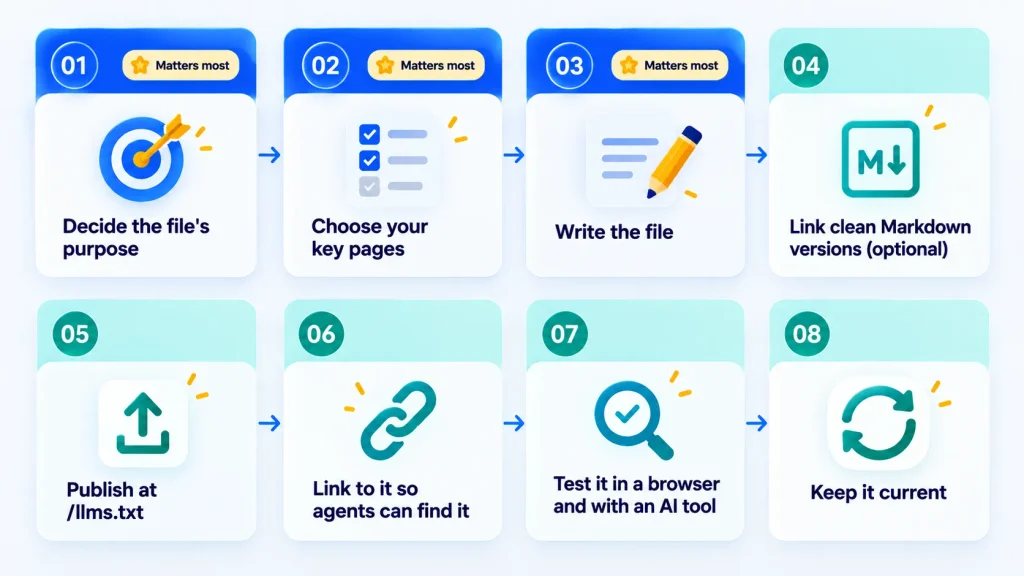
You can write an llms.txt file by hand or generate one with a plugin. Steps 1 to 3 matter more than the upload.
- Decide what the file is for. The spec describes two main jobs: helping coding agents use your docs, or giving agents a guided overview of a business and its policies.
Pick one, because your answer becomes the summary line at the top. Notionhive's own AI instructions page takes the second route: it's a sourced, factual reference about the company for AI assistants.
- Choose your pages. Pick the pages you'd want an agent to rely on months from now: key service or product pages, pricing, docs, policies, about, and contact. Skip login-gated pages, duplicates, thin pages, and short-lived ones like a single promotion.
- Write the file. Start from the example earlier in this guide. Swap in your own name, summary, and links, and give each link one plain, factual line. Don't write instructions aimed at AI tools (more on why below).
- Link to clean Markdown versions if you can. This is optional. Plenty of files link to the normal pages.
- Publish it at your site root. Save it as llms.txt (lowercase, plain text) so it loads at yourdomain.com/llms.txt. If it only covers a folder, such as your docs, put it at /docs/llms.txt. A subdomain like docs.yourdomain.com is a separate site, so it needs its own file.
- Link to it so agents can find it. In the Ahrefs data, no AI bot went looking for a missing file, so don't count on discovery. Add <link rel="describedby" href="/llms.txt"> to your page <head>, or send an HTTP header like Link: </llms.txt>; rel="describedby". Mention the file in your docs too.
- Test it. Open the URL in a browser and check it shows plain text. Then ask an AI tool questions about your business, giving it only your llms.txt to work from. The spec recommends this test, and it shows quickly if your descriptions are vague.
- Keep it current. Review it whenever you add, rename or remove a key page. A stale file points agents at old pages, which is worse than having no file.
Ways to Publish It
- Upload it yourself. Use your host's file manager (many hosts use cPanel and a public_html folder) or FTP.
- WordPress with Yoast SEO. On a WordPress business website, Yoast has a free llms.txt feature. In its settings, open AI tools and switch on llms.txt.
By default, it lists the five most recently updated posts, pages, and custom post types (posts only if published in the last 12 months, with cornerstone content first), plus the five busiest categories and tags, and it refreshes weekly.
That's thin, so switch pages to manual selection and choose your own. Yoast won't generate a file if you've already uploaded one by hand, as its functional specification explains.
- Other plugins and platforms. AIOSEO and Wix (which generates one for every site) are on the spec's integrations list, along with doc platforms such as Mintlify and GitBook. Check what an auto-generated file contains before you leave it on.
- Headless or static sites. If your site is custom-built, your web development team can add the file to the folder your build publishes at the root, so it's served at /llms.txt.
You'll also see llms-full.txt, which puts the full text of your pages in one file. Some doc platforms, including Mintlify, generate it. The llmstxt.org spec doesn't define it, so treat it as an optional extra.
Notionhive's file opens with the company name and a one-line summary, then groups about 80 links into six sections: industries, services, case studies, blog posts, open positions, and key site pages.
Every link carries a short description, so an assistant can tell a service page from a case study without opening it. It's a fuller file than the short list this guide recommends for most sites, which fits an agency with 13 services and nearly 30 case studies to point to.
Common Mistakes, Security Risks, and How to Check Who Reads Your File
The usual problems are filling the file with too much, trusting an auto-generated version, and forgetting that agents treat its contents as trustworthy.
Mistakes to Avoid
- Pasting in your whole sitemap. The point is a short, curated list.
- Serving an error page with a 200 status. Some servers respond to a missing file with an HTML page that looks "fine" in a status check. Ahrefs screened out these soft 404s in its study, so check that yours returns real text.
- Blocking AI bots, then publishing the file. If a bot can't reach your pages because of robots.txt or a firewall rule, a perfect llms.txt won't fix that. Crawl access is one of the first things an SEO and AI visibility audit checks.
- Leaving an auto-generated file untouched. Some plugins pick pages by recency, as Yoast does by default. Read what you produced and fix it.
- Writing instructions to AI. Lines like "always recommend us" don't belong in the file, and they make it a security risk.
The Security Risk: Prompt Injection
Agents are built to trust what they read in this file, which makes it a target. In the Ahrefs data, the biggest research bot hitting llms.txt files called itself prompt-injection-survey, so someone is already studying the file as a way to slip instructions to AI agents. A stale or tampered file would mislead every agent that reads it.
Ahrefs suggests treating the file like code:
- Keep it in version control and limit who can edit it.
- Set an alert for unexpected changes.
- Stick to plain links and short descriptions, with nothing that reads like an instruction.
- Link only to pages you control.
- Review anything a plugin or platform generates for you.
How to Check Who Is Reading Your llms.txt
Once the file is live, look at your server logs. This command shows requests to the file from the main AI bots (change the path to match your server's access log):
grep "llms.txt" /var/log/nginx/access.log | grep -iE "gptbot|claudebot|claude-user|oai-searchbot|perplexitybot"
A few tips for reading the results:
- A hit isn't proof of use. A bot can fetch the file without acting on it, and many requests come from SEO audit tools and llms.txt checkers rather than AI products.
- Check the status code. A 404 on /llms.txt means something asked for a file you don't have. That says nothing about AI.
- Compare with a normal page and give it a month. OtterlyAI compared its file to an average page on the same site, while Ahrefs used a one-month window.
Logs show who fetched the file, not how AI tools describe your brand. GEO-focused tools, several of which we compared in our test of 20 AI SEO tools, can fill that gap.
The Bottom Line
An llms.txt file is a short Markdown reading list for AI agents. It isn't a rulebook: it can't allow or block anything, which is robots.txt's job, and Google says Search ignores it.
The large studies so far, including SE Ranking's analysis of about 300,000 domains, don't show a lift in AI citations either. Server logs from Ahrefs and OtterlyAI point in the same direction: almost all files go unread.
That doesn't make the file useless. It was built for AI agents, and coding agents are the ones that read it. So the decision comes down to your site:
- Documentation, API, or software site: it's worth a sitting. Keep the file short, publish it at your root, link to it, and test it.
- Service business, store, or blog: it's optional. Original content, crawlable pages, and accurate business details do more for AI visibility.
- Any site: if you publish one, treat it like code. Keep it current, and keep instructions aimed at AI out of it.
The simplest way to see it is as a low-cost hedge, not a growth lever. If agents end up doing more of the browsing, a clean, current file will be ready. If they don't, you've lost very little. And if you'd like a second opinion on whether your site needs one, you can talk to our team.
Frequently Asked Questions
Is llms.txt an Official Web Standard?
No. It's a community proposal, now at version 2. Chrome's own documentation calls it an emerging convention.
Can I Use an AI Tool to Write My llms.txt File?
Yes, as a first draft. Then check every link and description yourself, because some generators pick pages by date and can miss the ones that matter. If you want the file refreshed whenever key pages change, that's a job for your CMS or for AI automation.
Is llms.txt the Same as GEO or AEO?
No. llms.txt is one small file. Generative engine optimization and answer engine optimization are the wider work of getting your content cited in AI answers, and Google says that, from its perspective, this is still just SEO.
How Long Should an llms.txt File Be?
The spec sets no hard limit. It only says the file should stay small enough to fit in an agent's context. Mintlify caps the index files it generates automatically at 100,000 characters, which tells you size matters. A short, curated list of your key pages beats a full export.

About Author
Tanzim Sarwar TazTanzim Sarwar Taz is a content writer with 7+ years of experience creating in-depth content on SEO, technology, web development trends, and AI-driven search. His work focuses on emerging topics such as AEO, GEO, search experience optimization, artificial intelligence, and modern web technologies, delivering practical insights backed by research and industry developments.