
Query fan-out is the technique AI search uses to split one question into several related searches, run them simultaneously, and combine the results into a single answer. Google documents it for AI Overviews and AI Mode.
So when someone types one prompt, the AI may run many searches on their behalf. Your page can be retrieved for one of those hidden searches even if it never ranked for the original words.
Here’s how it works and what you can do about it.
What Does Query Fan-Out Mean in Plain Words?
Think of a travel agent. You say, “Plan a family trip to Cox’s Bazar." The agent doesn't run one search. They check hotels, weather, flights, kid-friendly activities, and prices, then bring it all back as one plan.
AI search does something similar. Google describes query fan-out as a set of related queries generated by the model and run at the same time to gather more information than the original query would.
Google’s own example is “how to fix a lawn that’s full of weeds.” The AI might also search for the best herbicides, ways to remove weeds without chemicals, and how to stop weeds from coming back.
You typed one question. The system asked for at least four.
How Query Fan-Out Works, Step by Step
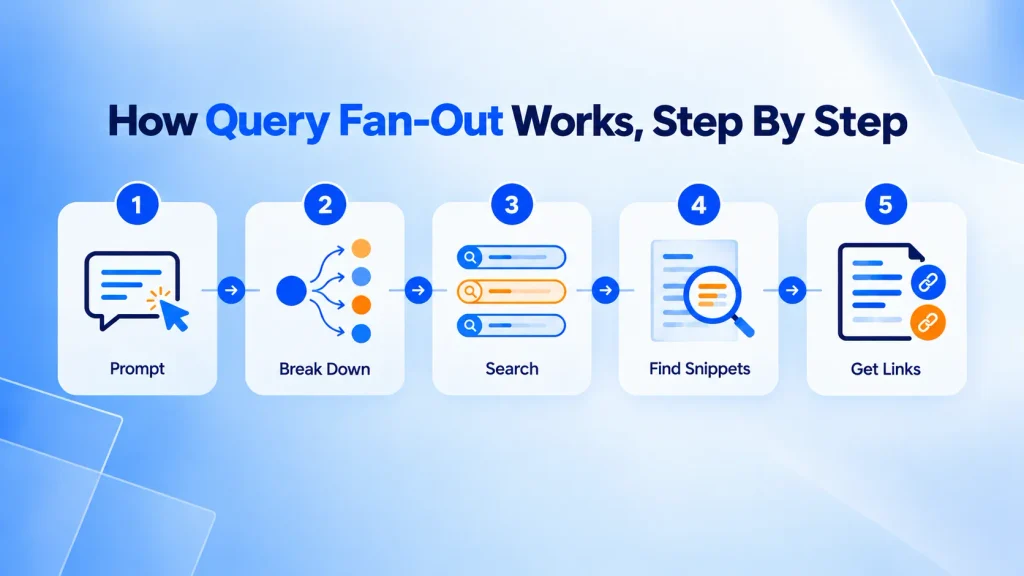
Google keeps the details high-level. In broad terms, the process looks like this:
- The AI reads your prompt. It judges how complex the question is. Simple factual questions may not need fan-out at all.
- It generates sub-queries. Each one targets a different angle of the question.
- It searches for all of them in parallel. Each sub-query gets its own retrieval, not just the top 10 results for your original words.
- It picks useful passages and pages. This is where retrieval-augmented generation (RAG) comes in: the model grounds its answer in pages from the search index.
- It writes one answer with links. Google says this lets it show a wider, more varied set of links than a classic search.
How many sub-queries? Google says only "a multitude." Search Influence reports that independent analyses estimate roughly eight to twelve per question. Treat that as a rough guide, not a rule.
Which Platforms Use It?
- Google AI Mode and AI Overviews: Documented. Google's AI features documentation says both may use query fan-out.
- ChatGPT Search and Perplexity: Both appear to run multiple searches before answering, and Perplexity shows its search steps as it works. Neither documents the method the way Google does.
From Keywords to Sub-Intents: What's Different
Traditional SEO starts with the keywords people type. Fan-out starts with the intents the AI infers.
| Human long-tail keyword | Fan-out sub-query | |
| Written by | A person typing | The AI model |
| Count per question | One | Several to many |
| Phrasing | Natural, sometimes messy | Compact, one facet each |
| Goal | Find a page | Gather evidence for one combined answer |
| In keyword tools? | Usually yes | Usually not listed, so you infer them |
That last row matters. You can’t pull a neat list of fan-out queries from a keyword tool. You have to reason about them.
Common Types of Sub-Intent
This is a working framework for sorting them, not an official Google list:
- Definition and entity: What is it, and which entities are involved?
- Attributes: Specs, features, requirements.
- Comparison: X vs Y, best options, alternatives.
- How-to: Steps, tools, process.
- Cost: Pricing, ranges, and what affects the price.
- Context: Location, industry, company size.
- Recency: Is this current? What changed this year?
- Trust: Reviews, proof, credentials, risks.
A Real Example: One CRM Query in Google’s AI Answer
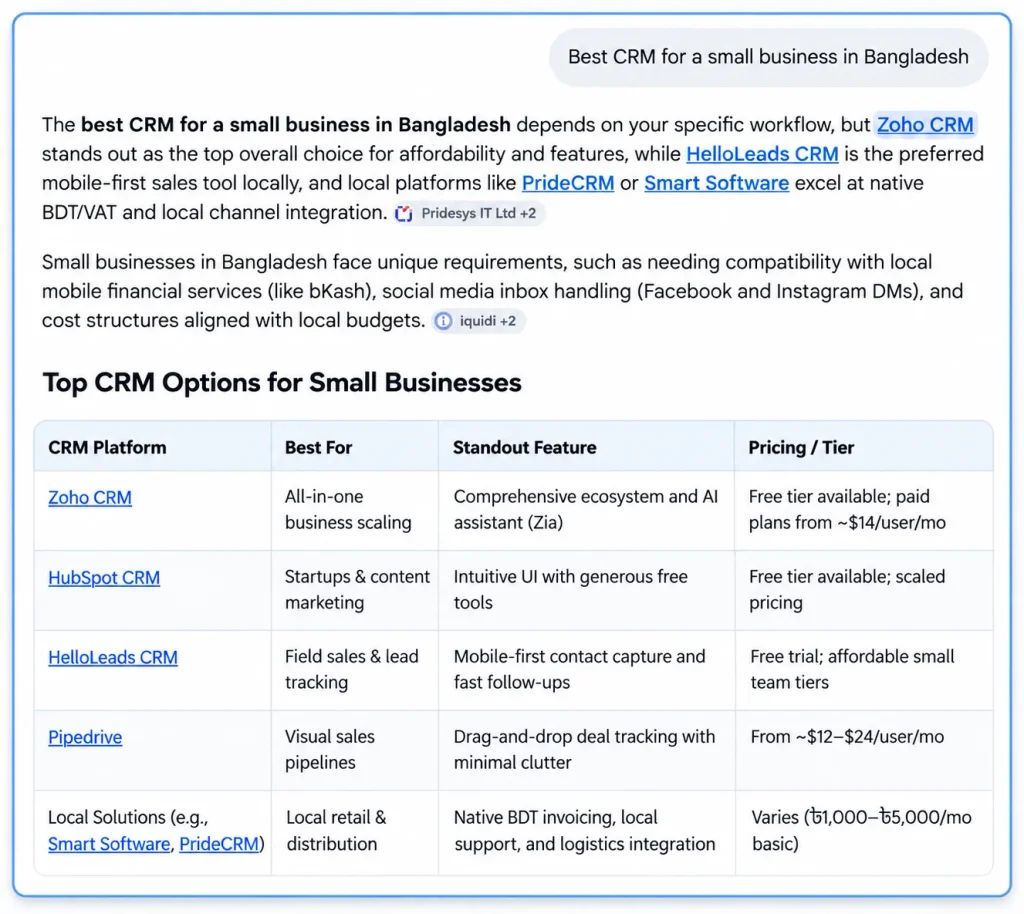
We searched “best CRM for a small business in Bangladesh” and captured Google’s AI-generated answer. We can’t see the sub-queries Google ran. But the answer shows what it was looking for.
Beyond a list of tools, the answer covered:
- Cost: free tiers and per-user pricing
- Local context: BDT and VAT invoicing, bKash compatibility
- Channels: Facebook and Instagram DM handling
- Comparison: a “best for” label for each tool
Notice what’s missing. In the part of the answer we captured, there were no reviews or recency checks, even though our framework lists both. Not every sub-intent shows up for every query. Which ones matter depends on what the person is trying to decide.
For the local details, the answer credited outside sources, including Pridesys IT Ltd and iquidi. A generic list of global CRMs says nothing about BDT, VAT, or bKash. That’s the gap a local page can fill.
Why Ranking #1 for One Keyword Isn’t Enough Anymore
You can rank first for a head term and still miss the answer. The AI builds its response from many searches, so a page that covers only one angle supplies only one piece.
That doesn’t mean classic rankings are dead. Google says AI features are rooted in its core ranking and quality systems, and AI Overviews often don’t trigger at all. Strong fundamentals still matter, and fan-out is just one part of how AI search changes SEO.
What changes is the unit you optimize. Instead of asking “Does this page rank for my keyword?”, ask “Does this page answer the questions a thorough reader would ask next?”
To measure it, Google points to the Generative AI performance report in Search Console. Check it before trusting any third-party tool that claims to show Google’s internal AI data.
How to Optimize for Query Fan-Out
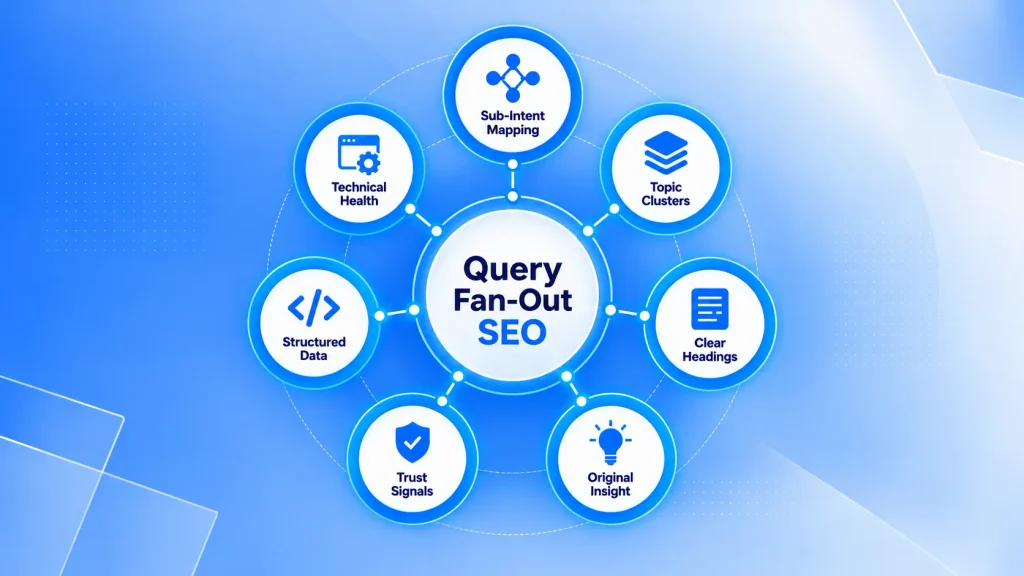
Google says there’s no special trick here. The advice below is mostly good SEO, applied with fan-out in mind.
1. Map the Sub-Intents Before You Write
Take your target query and list 8–15 follow-up questions a careful reader would ask. Good sources:
- People Also Ask boxes
- The follow-up questions AI Mode suggests
- Your own Search Console queries
- Questions your sales or support team hears every week
2. Cover the Sub-Intents on One Page or Across a Cluster
Use one page when a reader would want the answer in the same sitting. Use a separate page when a sub-topic is its own journey and needs real depth. Then link the pages together as topic clusters.
Don’t build a page for every possible fan-out query. Google warns that doing this, primarily to manipulate AI responses, can violate its scaled content abuse policy.
3. Use Clear, Modular Headings for Readers
Write headings that name the question, and answer it in the first sentence underneath. This helps people scan, and it helps systems find the right section.
Don’t chop content into tiny fragments for AI. Google says chunking isn’t required, and its systems can find the relevant part of a longer page.
4. Add What Only You Know
Google asks for non-commodity content: a unique point of view, first-hand experience, original examples. A page that restates the top 10 results gives the AI no reason to pick it. Add your own data, case notes, pricing ranges, and local context.
5. Show Trust Signals
Trust and recency are common sub-intents, so make them easy to verify. Strong E-E-A-T signals start with:
- A named author with credentials
- Sources for your claims
- Clear published and updated dates
- Visible company and contact details
Review your facts at least once a year, and sooner for fast-changing topics.
6. Use Structured Data as Hygiene, Not Magic
Schema markup helps search engines understand your page, and it can qualify you for rich results. But Google says no special schema.org markup is needed for AI features.
A sensible baseline is Article, Organization, Person (the author), and BreadcrumbList, plus LocalBusiness or Product where relevant. Always make sure the markup matches the visible text on the page.
7. Don’t Skip the Technical Basics
To appear as a supporting link, a page must be indexed and eligible to show with a snippet. Google’s guide also says a site must be included in Search generative AI features in Search Console. So check that:
- robots.txt and your CDN allow crawling
- Important content is in text, not only in images
- The page loads fast and works well on mobile
- Your site is included in the generative AI features in Search Console
If any of these fail, start with a technical SEO checklist.
What You Can Skip
Google’s guidance says you can ignore several popular “AI hacks” for Google Search:
- llms.txt files: Google Search ignores them. They neither help nor harm your rankings there.
- Rewriting everything for AI: Its systems understand synonyms, so you don’t need every long-tail variation.
- Buying or seeking fake mentions: It isn’t as helpful as it looks, and it’s inauthentic.
Other AI tools may behave differently, so test them separately rather than assuming Google’s rules apply everywhere. If you’re weighing AEO vs GEO, note that Google treats optimizing for AI search as part of SEO. The fundamentals come first.
A Quick Fan-Out Coverage Checklist
Before you publish or refresh a page, check that it:
- Answers the main question in the first few lines.
- Covers 8–15 likely follow-up questions, or links to a page that does.
- Includes at least one original example, data point, or first-hand insight.
- Shows author, source,s and dates.
- Has headings that read like real questions. It is indexable, snippet-eligible, and fast.
- Uses a schema that matches the visible content.
Key Takeaways
Query fan-out means your page can be found for searches nobody typed. Here’s what to remember:
- Query fan-out turns one prompt into many hidden searches, then merges the results into one answer.
- The unit of optimization is the sub-intent, not just the head keyword.
- Cover the follow-up questions with original, trustworthy content on one page or a linked cluster.
- Skip the shortcuts for Google Search. Google says chunking, llms.txt, and extra pages for every variant don’t help.
You don’t need a new playbook to act on this. Pick one important page, list the follow-up questions a careful reader would ask, and check whether the page answers them. A page that does, with a named author and details only you know, gives AI search a reason to pick it.
Want a second pair of eyes? Contact Notionhive, and we’ll map the sub-intents your key pages are missing and plan the content to fill them.
Frequently Asked Questions
What Is Query Fan-Out in SEO?
It’s the way AI search splits one query into several related sub-queries before building an answer. In SEO terms, it means your page can be retrieved for searches the user never typed.
Is Query Fan-Out the Same as Query Expansion?
They’re related, but not identical. Classic query expansion adds related terms to one search. Fan-out has the model generate separate searches for different facets of the question, then combine the results.
Can I See Which Fan-Out Queries Were Used?
Not reliably. Some AI tools show their search steps, but Google doesn’t give site owners a full list. Infer likely sub-queries from People Also Ask, AI Mode follow-ups, and your own data.
Does Schema Markup Help Me Get Cited?
It helps search engines understand your page, but Google says no special schema is required for AI features. Quality content and clear structure matter more.

About Author
Tanzim Sarwar TazTanzim Sarwar Taz is a content writer with 7+ years of experience creating in-depth content on SEO, technology, web development trends, and AI-driven search. His work focuses on emerging topics such as AEO, GEO, search experience optimization, artificial intelligence, and modern web technologies, delivering practical insights backed by research and industry developments.