If you’re a developer, you’ve probably heard the term Cross-Site Scripting (XSS) thrown around in security discussions. It’s one of the most common and dangerous vulnerabilities affecting websites and web applications.
But have you ever asked what exactly XSS is, and why you should be concerned about it?
In this blog, we’ll break down what XSS is, how it works, and most importantly, how to defend against it to keep your web applications secure.
What is Cross-Site Scripting (XSS)?
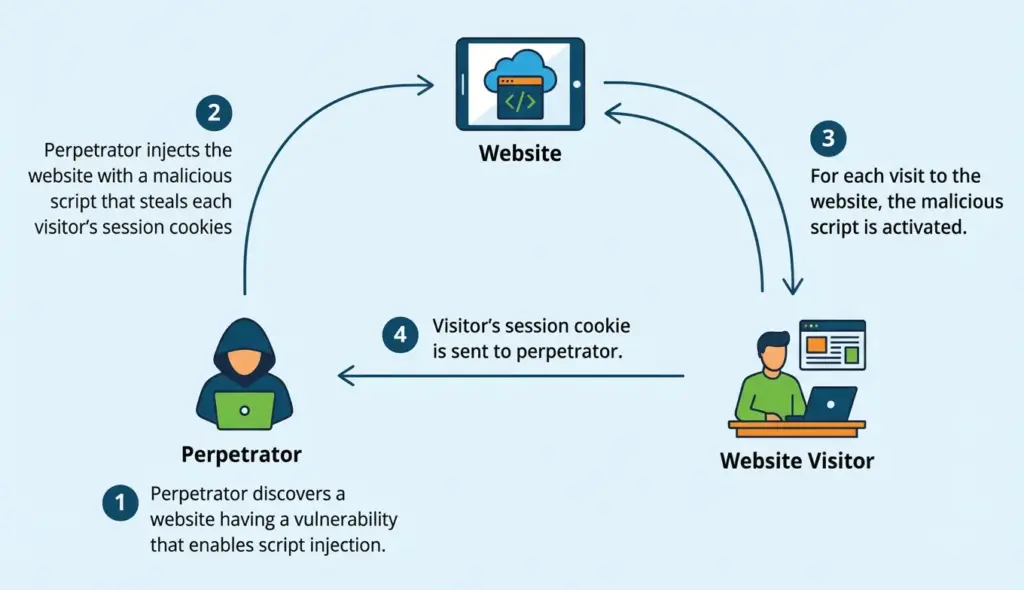
Cross-Site Scripting (XSS) is a security vulnerability that lets attackers inject malicious scripts into trusted websites. These scripts can then be executed by any browser used by visitors to the compromised site.
When an attacker injects a script into a page viewed by another user, they can perform malicious actions, such as stealing session cookies, redirecting users to malicious websites, or hijacking user accounts.
To put it simply, XSS occurs when malicious scripts are executed on a website you trust without your knowledge or permission. This allows attackers to swipe sensitive data or perform actions on users' behalf without their consent.
How XSS Works
Let’s break it down a bit further. Envision you own a website that lets users post comments. You want these comments to be visible to everyone, so you display them on the page.
However, if the site doesn't properly handle user input, someone could post a comment with malicious code in it, like this:
<script>alert('Your session has been hijacked');</script>When another user visits the website and checks that comment, the malicious JavaScript runs in their browser.
This script could cause significant harm: it might steal the user’s cookies (which contain session information), redirect them to a phishing site, or even execute actions on their behalf.
Protecting against these vulnerabilities is a key part of a professional web development company.
Types of XSS Attacks
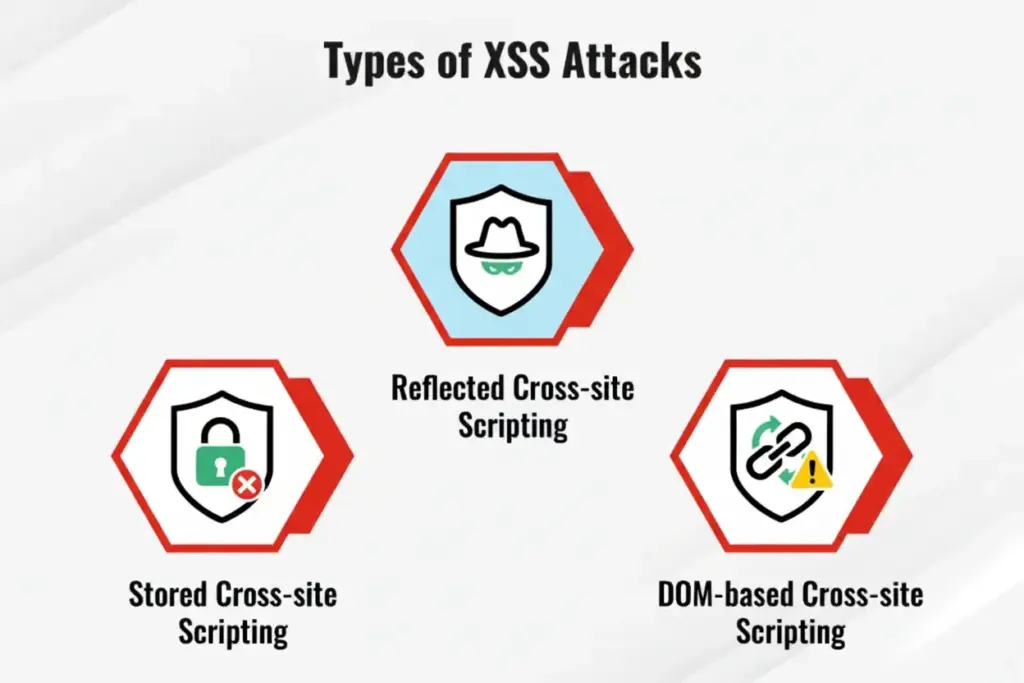
There are a few types of XSS attacks attackers may use, and each type works slightly differently. Understanding these types of web security threats will help you better defend against them.
1. Stored XSS
Stored XSS (also known as persistent XSS) happens when the malicious input is kept on the server, permanently.
This could happen when user input (such as comments, blog posts, or forum replies) isn’t properly sanitized and is stored in a database.
When other users see the page with the malicious input, the script runs in their browser, stealing cookies or performing other malicious actions. Since the malicious content is stored on the server, it can affect any user who views that page.
2. Reflected XSS
Reflected XSS occurs when the malicious script is reflected off the web server and executed immediately. This generally happens when a user clicks on a link containing a malicious payload in the URL or a query parameter.
For example, a URL could look like this:
http://example.com/search?q=<script>alert('XSS')</script>When the target clicks the link, the server returns the script to the user’s browser, which executes it. Unlike stored XSS, reflected XSS doesn’t persist on the server and only affects the user who clicks the malicious link.
3. DOM-Based XSS
DOM-based XSS occurs when the vulnerability exists in the client-side JavaScript rather than in the server-side code.
In this case, the attacker manipulates the browser's DOM (Document Object Model) by injecting a malicious payload into the URL or user input. The script then interacts with the web page, causing the attacker’s code to execute.
DOM-based XSS attacks are harder to detect because they don’t always involve the server. The malicious code is run in the browser by manipulating the DOM.
Real-Life Examples of XSS Attacks
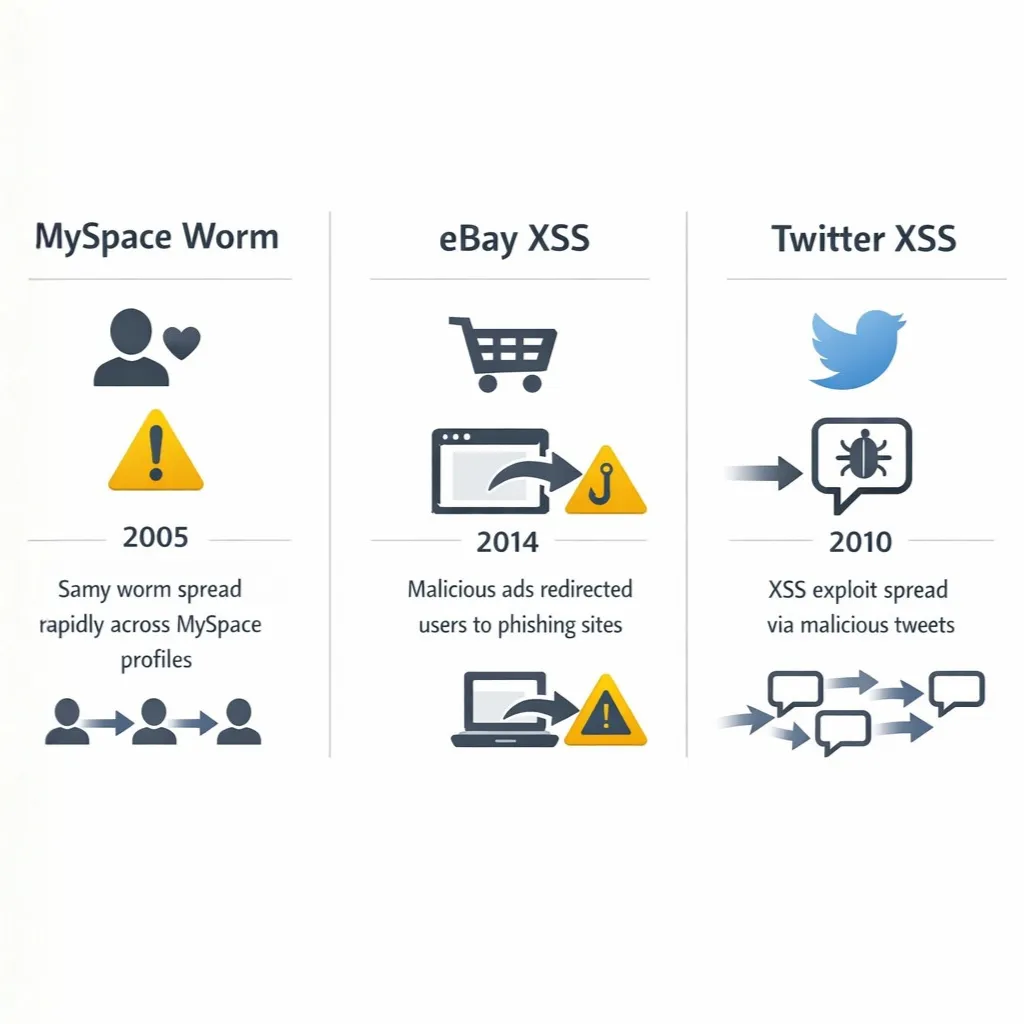
To really understand the impact of XSS, let’s look at some real-life examples where XSS attacks caused big problems.
Example 1: MySpace Samy Worm (2005)
One of the most infamous XSS attacks in history was the MySpace Samy Worm. Samy Kamkar, a hacker, created a worm that exploited an XSS vulnerability on MySpace.
When users viewed a profile that contained the malicious script, the worm would add Samy as a friend, display a message, and automatically spread to their profiles as well.
In just 20 hours, Samy had over 1 million new friends, and the attack spread like wildfire. This attack exploited the fact that MySpace didn’t sanitize user input properly, allowing attackers to inject JavaScript into the profile descriptions.
Example 2: eBay (2014)
In 2014, eBay suffered from an XSS vulnerability that affected its website’s search functionality. Attackers exploited this vulnerability to inject malicious scripts into the search results page.
When users clicked on these search results, the script would execute in their browsers, potentially stealing session cookies and redirecting users to phishing websites.
Although the vulnerability was patched quickly, it highlighted how even trusted platforms like eBay can be vulnerable to XSS if they don’t take proper precautions.
Example 3: Twitter XSS Vulnerability (2010)
In 2010, Twitter had an XSS vulnerability that allowed an attacker to post a tweet with a malicious link. When other users clicked on the link, they were redirected to a site that could steal their cookies and perform unauthorized actions on their behalf.
As a result, Twitter had to suspend certain features and quickly implement security fixes temporarily. This incident showed that even social media giants weren’t immune to XSS vulnerabilities.
These incidents highlight the importance of security practices in custom web development.
How XSS Affects Users
Why is XSS such a big deal? After all, it’s just a script running in someone’s browser, right?
Well, not exactly. Let’s look at what XSS can allow an attacker to do and why it’s so dangerous.
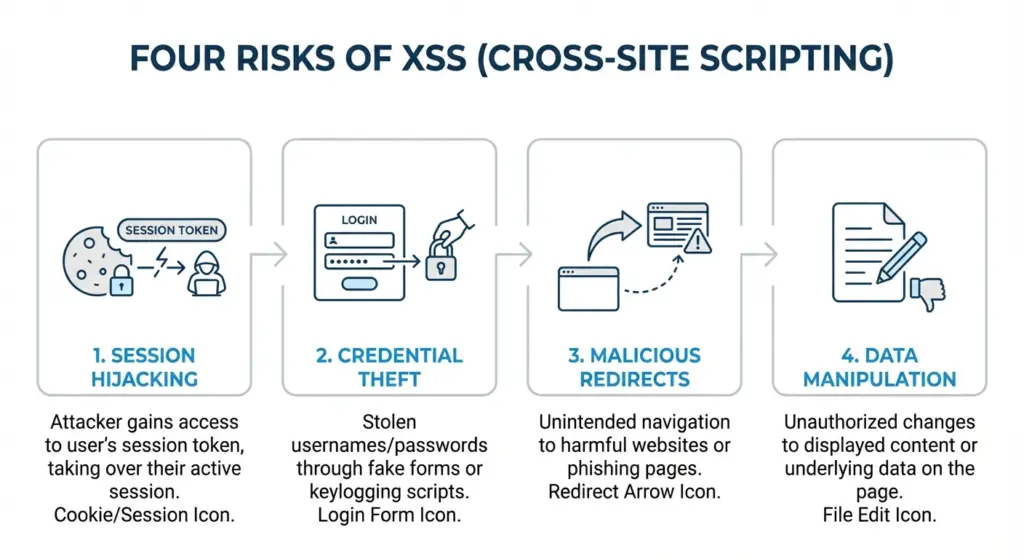
1. Session Hijacking
One of the most common and harmful consequences of XSS is session hijacking. When an attacker steals your session cookie (which is typically used to keep you logged in to a website), they can impersonate you on that website.
This means they can access your account, perform actions as you, or even steal sensitive data.
If an attacker injects a script that steals your session cookie and sends it to them, they can log into your account without knowing your password.
2. Credential Theft
XSS can be exploited to divert users to phishing websites that look identical to the legitimate website. If users unknowingly enter their login credentials into these fake sites, attackers can capture their usernames and passwords.
This is especially dangerous for financial or personal data. Understanding phishing attempts can help users recognize these threats.
3. Malicious Redirects
Another consequence of XSS is the ability to redirect users to malicious websites. Attackers can inject JavaScript that causes the browser to load a different page, which could be a site that installs malware or prompts the user to download something harmful.
4. Data Loss or Corruption
In some cases, XSS can be used to execute malicious actions on behalf of users. For example, an attacker could use XSS to send requests to a website that modify the user’s data, delete posts, or even steal files from their account.
This can lead to information loss or corruption without the user’s knowledge.
How to Defend Against XSS Attacks
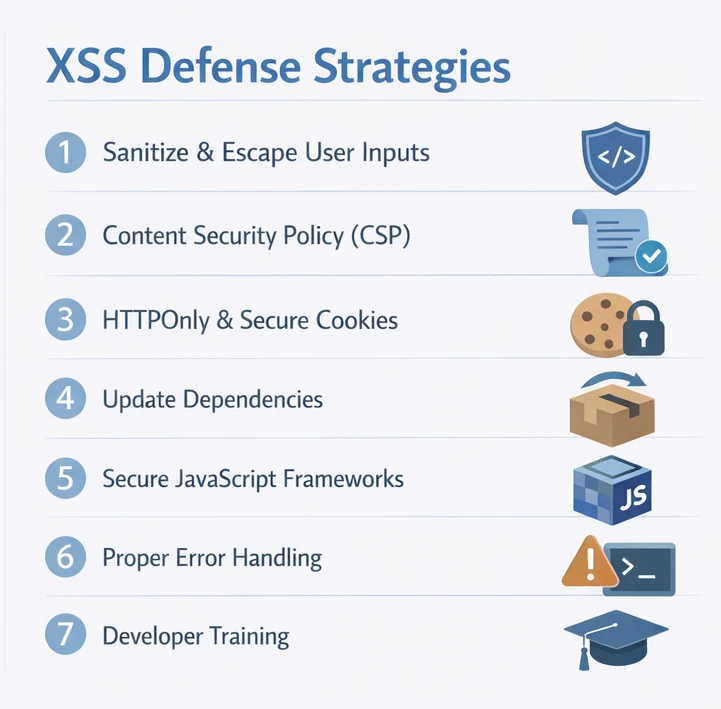
Now that you understand the dangers of XSS and the different ways attackers can exploit it, let’s talk about how you can defend your applications from this vulnerability.
Learning how to make a website more secure in 2026 requires a multi-layered defense strategy. Here are some best practices to keep your site safe from XSS.
1. Sanitize and Escape User Inputs
The most important step in preventing XSS is validating and sanitizing all user input. You should never trust user data—always sanitize and escape it to ensure it doesn’t contain malicious code.
This means stripping out any JavaScript, HTML tags, or other potentially dangerous content before it gets displayed on the page.
Escaping Output:
When you display user input, always escape the output to ensure that any potentially harmful code is treated as plain text.
For example, when displaying HTML, make sure that any <, >, and other special characters are properly escaped so they aren’t executed as HTML or JavaScript.
Here’s an example in JavaScript:
const userInput = "<script>alert('XSS');</script>";
const safeInput = userInput.replace(/</g, "<").replace(/>/g, ">");
document.getElementById("output").innerHTML = safeInput;2. Content Security Policy (CSP)
Content Security Policy (CSP) is a powerful tool that helps stop XSS attacks by limiting the sources from which content (like JavaScript) can be loaded.
By setting a strict CSP, you can control where scripts, images, stylesheets, and other resources can come from, reducing the chances of an attacker injecting malicious content.
Example of a CSP header:
Content-Security-Policy: default-src 'self'; script-src 'self' https://trusted.com;This header tells the browser to only allow JavaScript from your domain (self) and a trusted source (https://trusted.com).
3. Use HTTPOnly and Secure Cookies
Ensure that session cookies are marked as HTTPOnly and Secure. This means that the cookies will not be accessed via JavaScript (which helps prevent XSS from stealing them) and that they will only be sent over HTTPS connections.
4. Regularly Update Dependencies
It’s important to keep your libraries and frameworks up to date. Sometimes, vulnerabilities in third-party libraries can expose your site to XSS attacks.
Regularly check for updates and patches to confirm that your application is not vulnerable due to outdated components. Many modern frameworks and libraries implement security patches for known vulnerabilities, including XSS.
To help you with this:
- Use automated dependency management tools such as npm audit (for Node.js) or Snyk to detect vulnerabilities in your third-party libraries.
- To stay up to date on security fixes, register for security newsletters or follow the repositories of the libraries you use.
This is especially important when building modern web applications or working with API development.
5. Use JavaScript Frameworks That Help Mitigate XSS
Many popular JavaScript frameworks (like Angular, React, and Vue.js) automatically escape user input and help prevent XSS by design. These frameworks sanitize input to ensure that user data is treated as data, not executable code.
For example, Angular automatically escapes expressions in templates, ensuring that untrusted input won’t be interpreted as HTML or JavaScript. Similarly, React escapes all user input and ensures it is rendered as text rather than executable code.
6. Implement Proper Error Handling
Sometimes, error messages can expose too much information about your application and its backend.
Detailed error messages could give an attacker insight into the structure of your database, the programming languages you're using, or even the vulnerabilities in your code.
To avoid this:
- Do not disclose exact error messages to the user. Instead, show a generic message like, “An error occurred. Please try again later.”
- Log errors securely on the server side for review by the development team, but ensure that they don’t reveal sensitive information.
If you're working with WordPress, proper error handling becomes even more critical.
7. Educate and Train Your Team
XSS vulnerabilities are often introduced due to a lack of awareness or knowledge. Ensuring that your development team understands the risks of XSS and how to prevent it is crucial.
Developers should be well-versed in security best practices and regularly updated on common vulnerabilities.
Arrange periodic security training sessions and workshops to educate your team on the most recent web security best practices.
Tools to Detect and Prevent XSS
While securing your codebase through development practices is essential, tools can help you detect XSS vulnerabilities and implement effective security measures. Here are a few tools you can use:
1. OWASP ZAP (Zed Attack Proxy)
OWASP ZAP is a powerful open-source security testing tool developed to find vulnerabilities in web applications. It’s particularly effective for detecting XSS and other web application security issues.
ZAP can automatically crawl your web application and detect common vulnerabilities, including XSS, by actively testing your application for unsafe behaviors.
2. Burp Suite
Burp Suite is another popular tool used for penetration testing. It has a powerful suite of features, including an intruder for automating attacks and a scanner to identify XSS vulnerabilities.
It can be invaluable in identifying reflected XSS attacks, and security professionals widely use it for testing the security of web applications.
3. SQLMap
While primarily designed for SQL injection, SQLMap can also help with XSS detection when SQL injection may result in stored XSS vulnerabilities.
It automates the detection of SQL injection flaws and can also help identify cross-site scripting vulnerabilities arising from improper database interactions.
Conclusion
Cross-Site Scripting (XSS) is a crucial vulnerability that can severely affect both users and organizations.
It’s a type of attack that exploits web applications that improperly handle user input, allowing attackers to execute malicious scripts in unsuspecting users' browsers.
As we’ve seen through real-life examples, the impact of XSS can range from session hijacking to financial losses and data breaches.
Defending against XSS requires a combination of best practices:
- Properly sanitizing and escaping user input
- Using a Content Security Policy (CSP)
- Applying the HTTPOnly and Secure cookie flags
- Keeping dependencies updated
- Leveraging modern frameworks that escape user data automatically
- And educating your development team about secure coding practices
By taking these actions, you may greatly reduce the risk of XSS vulnerabilities in your web applications and create a safer experience for your users.
FAQs
- What is Cross-Site Scripting (XSS)?
XSS is a vulnerability that enables hackers to insert malicious code into trusted websites, which is then executed by other users’ browsers. This can result in session hijacking, loss of data, and unwanted site activity. - How does XSS work?
XSS works when a web application includes untrusted data in the output to the browser, without properly validating or encoding it. This allows hackers to insert malicious scripts that run on the client's side. - What are the different types of XSS?
The main types of XSS are Stored XSS, Reflected XSS, and DOM-based XSS. Stored XSS persists in the database, reflected XSS is immediately executed after the user clicks on a malicious link, and DOM-based XSS is triggered by client-side JavaScript manipulation. - What is the impact of an XSS attack?
The impact of an XSS attack can range from session hijacking, stealing sensitive data (like passwords or credit card information), redirecting users to malicious websites, and even modifying a user’s data or performing actions on their behalf. - How can I prevent XSS attacks on my website?
Prevent XSS attacks by validating and sanitizing user inputs, escaping output, using a Content Security Policy (CSP), and setting cookies as HTTPOnly and Secure. Additionally, use frameworks that automatically escape data, and regularly update your dependencies. - What is a Content Security Policy (CSP)?
CSP is a security feature that helps to prevent XSS attacks by indicating which content sources are trusted. It can stop harmful scripts from running by regulating where resources such as scripts, pictures, and stylesheets are loaded. - How can I sanitize user inputs to prevent XSS?
Use proper input validation techniques like whitelisting valid characters, rejecting unexpected data, and escaping any special characters that could be interpreted as HTML or JavaScript. - Can XSS affect mobile apps?
Yes, XSS can affect mobile apps if they display content fetched from untrusted sources and don't properly sanitize or validate the data before rendering it. Webview-based mobile apps are particularly vulnerable. - Can a Content Security Policy (CSP) block XSS?
Yes, CSP can help mitigate XSS attacks by specifying trusted sources for content. It prevents malicious scripts from executing if they are not loaded from a trusted source. - How can I detect XSS vulnerabilities in my web application?
Use tools like OWASP ZAP, Burp Suite, or SQLMap to scan for XSS vulnerabilities. These tools can identify common XSS flaws in your application by simulating attacks and examining how the web application handles user inputs.

About Author
Tanzim Sarwar TazTanzim Sarwar Taz is a content writer with 7+ years of experience creating in-depth content on SEO, technology, web development trends, and AI-driven search. His work focuses on emerging topics such as AEO, GEO, search experience optimization, artificial intelligence, and modern web technologies, delivering practical insights backed by research and industry developments.