We know that security is essential when building or managing web applications.
But have you ever stopped to think about the most common threats your application faces?
The OWASP(Open Worldwide Application Security Project) Top 10 is a great place to start. It identifies the 10 most critical web application security risks. Let's go straight into them and see how you can protect your apps and data from attackers!
1. Injection Attacks
Let’s start with a big one—Injection attacks!
If you’ve ever filled out a form online or interacted with a search bar, you might not realize that the input fields you use can become an entry point for attackers.
They can manipulate your app to run malicious commands, like SQL queries, and steal sensitive data. Sounds alarming, right?
What Is an Injection Attack?
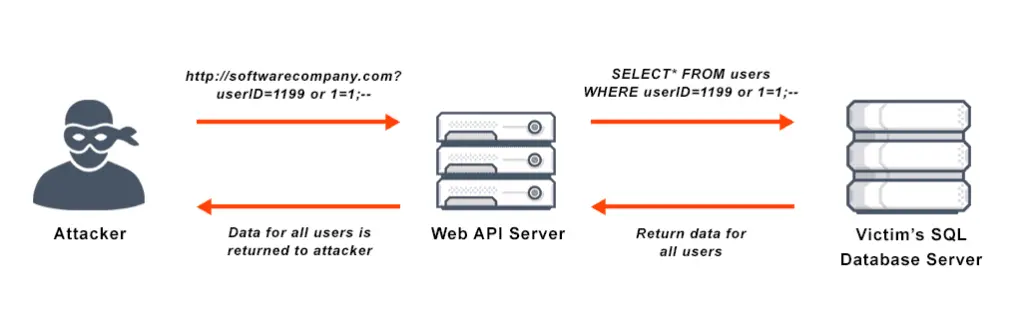
Injection attacks happen when an attacker inserts malicious code into a system’s input fields.
For instance, in SQL injection, an attacker might enter a harmful SQL query into a user-input form. If your application isn’t properly validating the input, it may run those SQL commands in your database, which is a huge security risk!
This is especially important when building APIs for modern web applications.
Think about it: what would happen if a user could gain access to your database just by entering a few lines of code into a login form? Pretty scary, huh?
Types of Injection Attacks
- SQL Injection: This is the classic. Attackers modify SQL queries to get unauthorized access to or manipulate data in your database.
- Command Injection: Here, attackers execute system commands on the server.
- LDAP Injection: Attackers exploit vulnerabilities in the LDAP protocol to access unauthorized directory services.
- XPath Injection: This happens when attackers manipulate XPath queries to access or modify XML data.
How You Can Prevent Injection Attacks
- Use Parameterized Queries: When working with SQL, use parameterized queries to confirm user input is treated as data, not code. This is one of the best ways to avoid SQL injection.
- Sanitize User Inputs: Don’t just accept input at face value. Validate it! Make sure it doesn’t contain malicious code.
- Avoid Dynamic SQL: Instead of building SQL queries by concatenating user input, use safer methods like prepared statements.
2. Security Misconfiguration
Security misconfigurations can happen anywhere in your application stack, whether it's in the web server, database, or even in your cloud services.
This risk is rising because generative AI in software development and complex modern stacks increase the chance of human error.
What Is Security Misconfiguration?
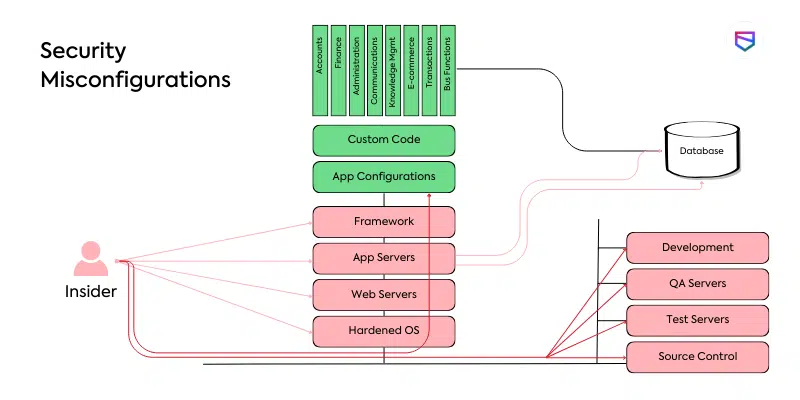
Security misconfiguration occurs when your app or server is not set up securely. This includes using default settings, leaving unused ports open, or not disabling unnecessary features.
Any gap in your configuration can expose your app to attackers.
Think about this: attackers don’t need zero-day exploits when they can just scan for default passwords or open debug endpoints and walk right in!
How to Prevent Security Misconfiguration
- Review Configurations Regularly: Periodically check your server and app configurations to make sure everything is secure.
- Disable Unused Services: Turn off any features, services, or ports that your app doesn’t need.
- Automate Configuration Management: Use automated tools to help you manage configurations and keep them consistent across environments.
For practical steps in 2026, see our article on how to make a website more secure.
3. Software Supply Chain Failures
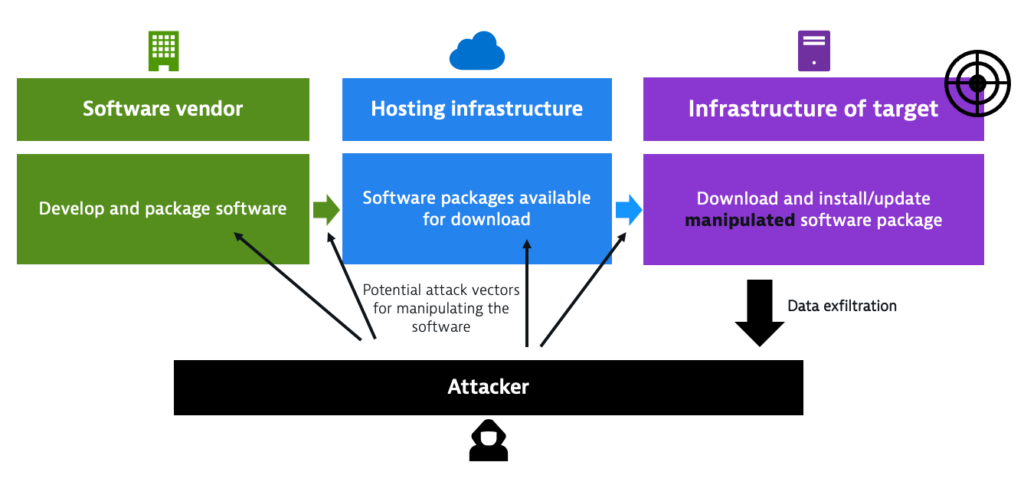
You might not think about it much, but Software Supply Chain Failures are something you need to keep on your radar.
This happens when the third-party software you use (like libraries, frameworks, or even build systems) has vulnerabilities that attackers can exploit. As you build progressive web apps (PWAs), you likely rely on many dependencies.
What does it mean?
Software supply chain issues occur when something you depend on, such as a library or tool, contains a security flaw. The problem could spread to your app if you're using outdated or compromised software.
How do you handle it?
- Regularly Update Libraries and Frameworks: Always keep your dependencies up to date, especially security patches. Tools like OWASP Dependency-Check can help you track known vulnerabilities.
- Use Trusted Sources: Only use libraries and frameworks from trusted sources, such as official repositories.
- Audit Your Dependencies: Use software composition analysis (SCA) tools to maintain an inventory of all components and check them against public vulnerability databases (CVEs).
4. Cryptographic Failures
What is a cryptographic failure? In simple terms, a cryptographic failure occurs when sensitive data is not properly protected or encrypted.
For example, storing passwords without hashing them, using deprecated algorithms, or failing to encrypt data in transit all fall under this umbrella. These failures directly expose sensitive data.
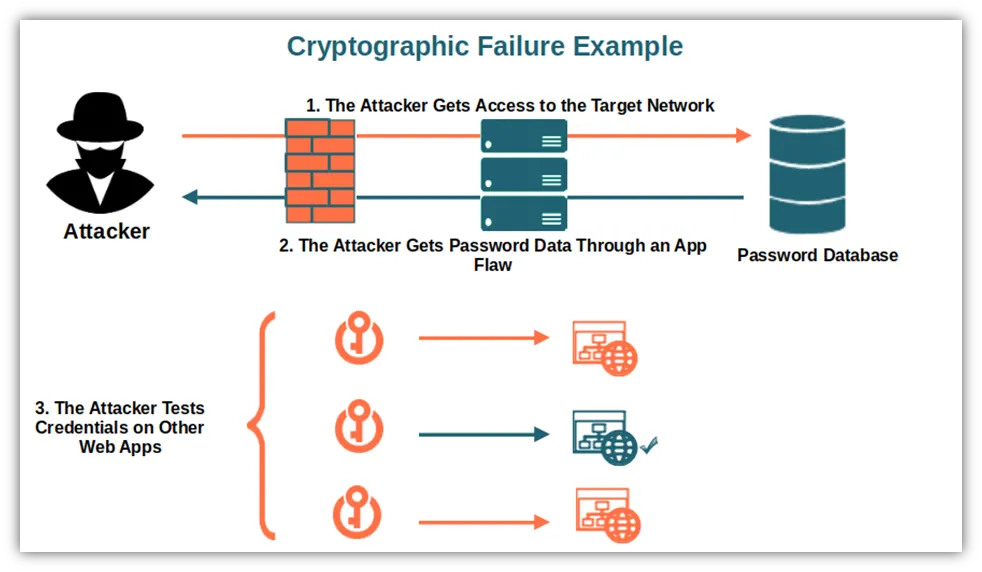
Strong crypto is the difference between a minor incident and a headline-making catastrophe!
Ways to Prevent Cryptographic Failures
- Use Strong Encryption Algorithms: Always use current, well-regarded encryption standards such as AES and RSA.
- Implement Secure Key Management: Protect cryptographic keys carefully and rotate them regularly.
- Enable Transport Layer Security (TLS): Ensure that data transmitted over networks is properly encrypted to avoid exposure.
5. Broken Access Control
When your app doesn't check whether a user is allowed to access something or perform a specific action, this is called broken access control. This is a common issue found during website maintenance audits.
For example, a user might access another user's private messages or escalate their privileges to admin levels because the system doesn't properly validate their permissions.
It’s easy to overlook, but think about it: If someone gains unauthorized access to confidential data, that could lead to a data breach or even financial loss for your business.
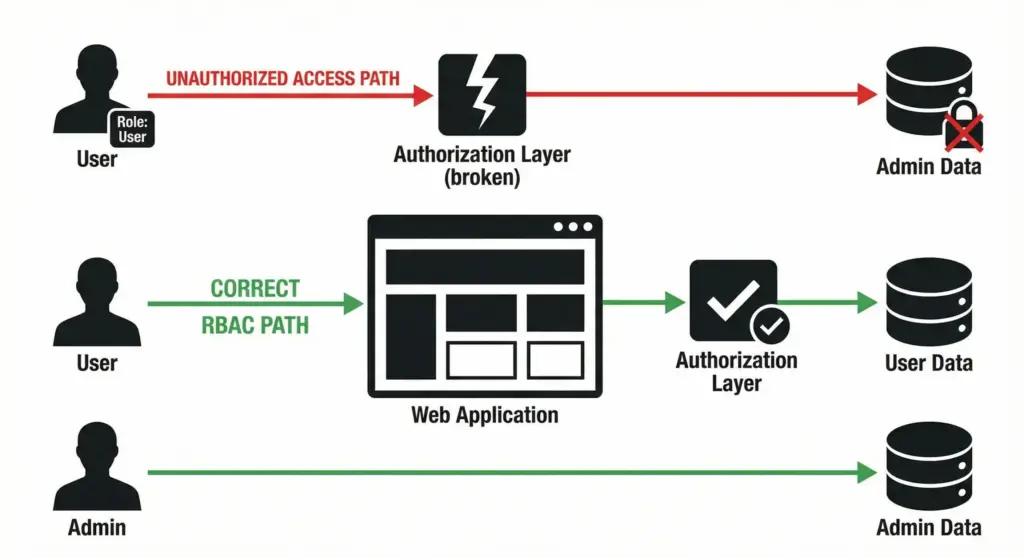
How to Fix Broken Access Control
- Enforce Role-Based Access Control (RBAC): With RBAC, you guarantee users can only access the parts of the system relevant to their role, preventing them from accessing sensitive resources they don’t need.
Good UI/UX design should make these access boundaries clear and intuitive
- Always Check Permissions on the Server-Side: Never trust client-side data. Always validate access control on the server-side.
- Apply Object-Level Access Control: Ensure that users can only access the specific objects they are authorized to. For example, they should not be able to view another user's data.
6. Insecure Design
Now, let’s talk about Insecure Design. This is something that happens during the development phase when security isn’t properly considered. Whether you're building a custom web application or working with platforms like WordPress, security needs to be part of the foundation.
What does insecure design mean?
Insecure design is about flaws in the way your app was planned. Maybe you didn’t think about secure authentication from the start, or you didn't model potential threats properly. These mistakes can leave gaps that attackers can exploit.
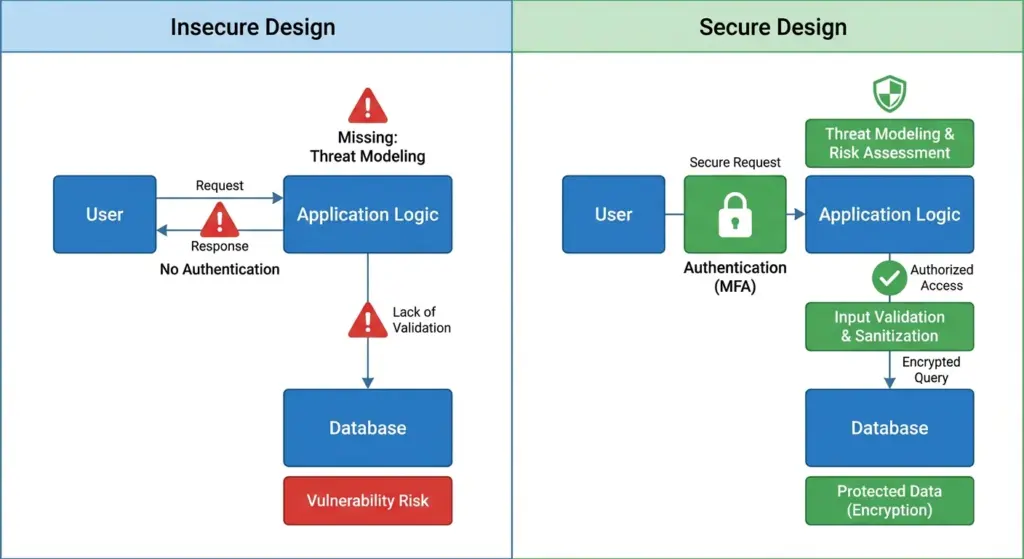
How do you prevent insecure design?
- Use threat modeling early on. Think about potential security issues during the design phase and address them before you start building.
- Follow secure coding guidelines. Ensure developers are aware of security best practices when writing code.
- Perform regular security reviews. Don't just design securely, keep checking and improving your app’s security as it evolves.
7. Authentication Failures
Next up is Authentication Failures. This one’s critical because if someone can bypass your authentication system, they can get unauthorized access to user accounts and sensitive data.
This is why many brands stay safe on Facebook and other platforms by using extra security layers
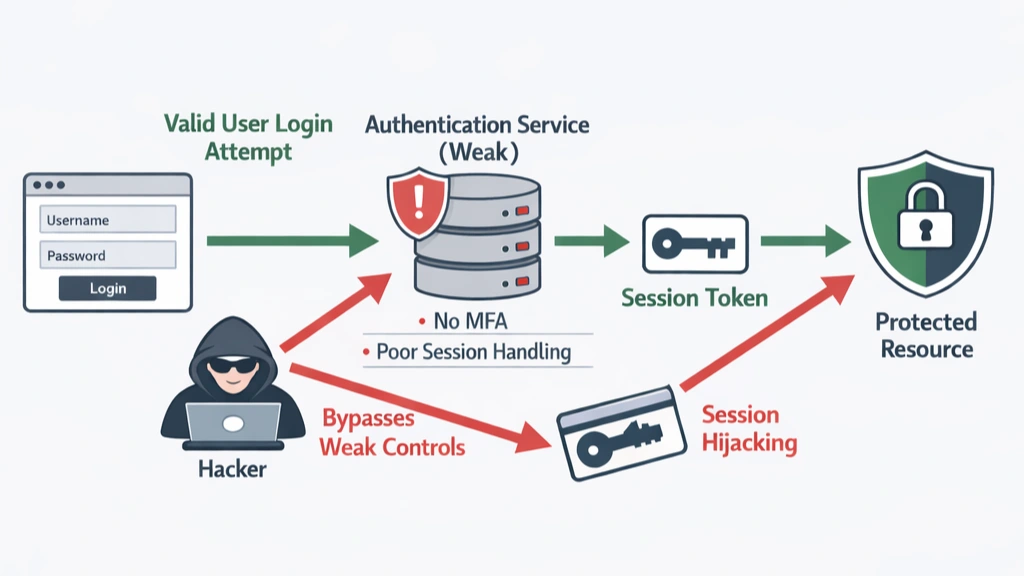
What are authentication failures?
Authentication failures happen when your app’s login system is weak. Maybe passwords aren’t secure enough, or sessions aren’t appropriately managed. If attackers guess passwords or hijack sessions, they can easily access your app.
How do you fix authentication failures?
- Use multi-factor authentication (MFA). This counts an extra layer of protection, making it more hard for attackers to gain access.
- Manage sessions securely. Always regenerate session tokens after login and make sure they expire when needed.
- Enforce strong passwords. Instruct users to use strong, unique passwords and enforce complex password policies.
8. Software or Data Integrity Failures
Let’s talk about Software or Data Integrity Failures. These occur when your app fails to maintain the integrity of its software or data, making it vulnerable to tampering.
What is a software or data integrity failure?
This happens when the integrity of your software or data isn’t correctly verified, allowing attackers to modify it without detection.
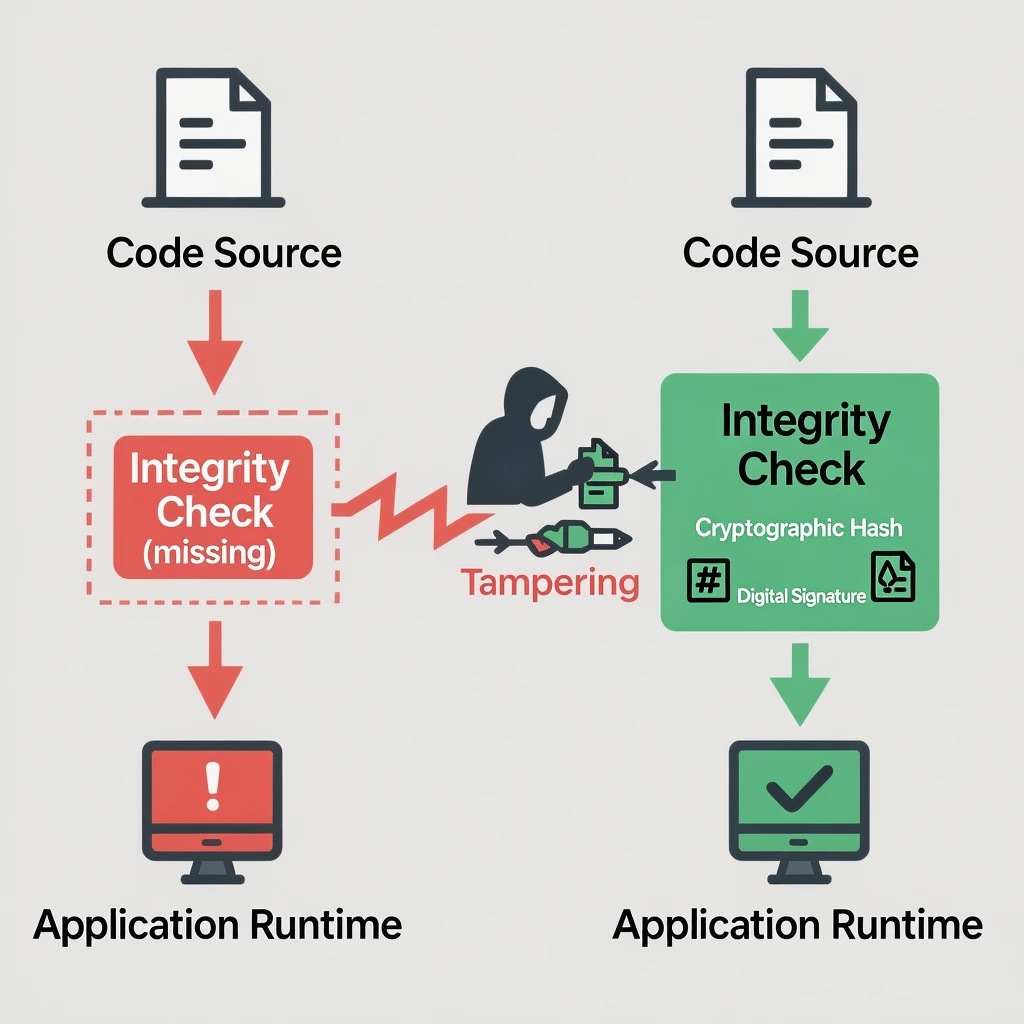
For example, if someone can modify your application’s code or change the data it processes, that’s a serious problem.
How do you protect data integrity?
- Use cryptographic hashes to confirm the integrity of software and data.
- Sign your code to ensure users receive the exact version you’ve approved.
- Monitor integrity regularly. Use tools to check that data and software haven’t been tampered with.
9. Logging and Alerting Failures
One often overlooked area is Logging and Alerting Failures. Imagine an attacker is in your system, but you don’t have proper logs set up to detect them. By the time you notice, they’ve already caused damage.
This is a primary factor in the web security landscape of modern data breaches.
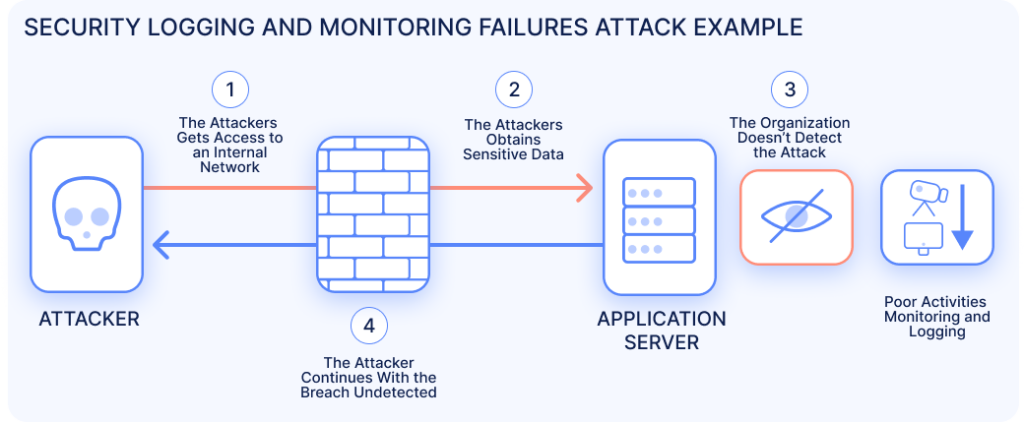
What are logging and alerting failures?
This happens when an app fails to log important events or doesn’t alert administrators when something suspicious happens. Without proper logs and alerts, attackers can operate undetected.
How do you fix it?
- Enable detailed logging for all critical actions.
- Set up automatic alerts to notify you of unusual activity, like multiple failed login attempts.
- Review logs regularly. It’s not enough to collect logs—you need to analyze them for potential threats.
10. Mishandling of Exceptional Conditions
Finally, we have Mishandling of Exceptional Conditions. This category includes things like improper error handling or leaving your app in an insecure state when things go wrong.
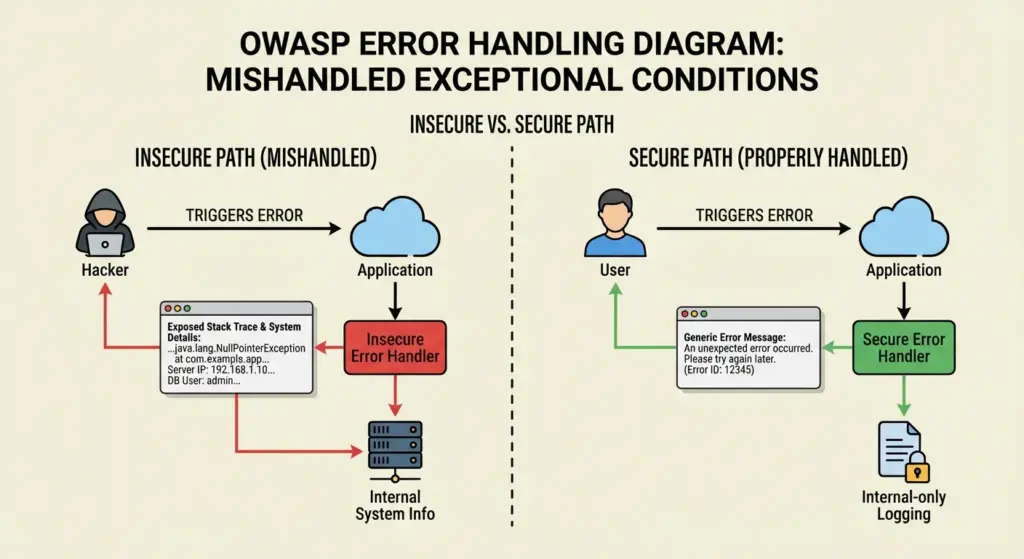
What is mishandling exceptional conditions?
When an application doesn’t handle errors correctly, it can expose sensitive information or leave the system vulnerable. For example, detailed error messages might show stack traces or database info that attackers can use.
How do you prevent this?
- Handle errors securely and ensure they don’t reveal sensitive information.
- Fail securely when something goes wrong, making sure the system doesn’t leave critical resources exposed.
- Monitor for exceptions to identify and address issues quickly.
Conclusion
You now know the OWASP Top 10, the ten most common security risks that attackers exploit every day. These aren’t just ideas; they represent real weaknesses that can expose your applications if you ignore them.
Security means more than fixing bugs. It starts with building apps that expect attacks from the beginning.
Strengthen your authentication, validate every user input, encrypt sensitive data, harden your configurations, log important events, and keep your libraries up to date. These simple steps block most attacks before they happen.
Take action today. Pick one risk, apply the fixes, and you’ll make your app much harder to breach right away.
FAQs
- What is the OWASP Top 10?
The OWASP Top 10 is a list compiled by the Open Web Application Security Project that highlights the most crucial web application security risks. - How often is the OWASP Top 10 updated?
The OWASP Top 10 is typically updated every 3-4 years to reflect the latest trends and vulnerabilities in web security. - Can OWASP Top 10 help me secure my app?
Yes, addressing the OWASP Top 10 vulnerabilities is an excellent first step toward securing your web applications. - What’s the best way to prevent Broken Access Control?
Implement role-based access control (RBAC), always validate permissions on the server side, and ensure users can access only the data and actions they are authorized for. - How can I prevent Security Misconfiguration?
Regularly review your application and server configurations to ensure unnecessary services are disabled, and all systems are patched and securely configured. Automate configuration management to keep things consistent. - How can I avoid Software Supply Chain Failures?
Regularly update the third-party components you use and check for known vulnerabilities. Always source software from trusted and verified repositories, and ensure your build pipeline is secure. - How do I avoid Cryptographic Failures?
Use strong encryption algorithms like AES and RSA, ensure passwords are securely hashed with algorithms like bcrypt, and always encrypt sensitive data in transit and at rest. - What’s the best way to prevent Injection Attacks?
To stop malicious code from being executed, use prepared statements and parameterized queries. Also, always sanitize user input to prevent code injection vulnerabilities. - How can I prevent Insecure Design?
Start with threat modeling and ensure your application is built with security in mind. Regularly review the design to identify any potential vulnerabilities and enforce secure coding practices throughout development. - What can I do to prevent Authentication Failures?
Implement multi-factor authentication (MFA), enforce strong password policies, and use secure session management to prevent unauthorized access to user accounts. - How do I protect against Software or Data Integrity Failures?
Use cryptographic hashes to confirmthe integrity of software and data, sign your code to ensure authenticity, and implement monitoring to detect unauthorized changes or tampering. - Why is logging and alerting necessary for security?
Logging and alerting help you detect suspicious activity early. By setting up comprehensive logs and real-time alerts, you can quickly respond to security incidents before they escalate into bigger issues. - How can I prevent the Mishandling of Exceptional Conditions?
Ensure your application handles errors securely by avoiding detailed error messages that expose sensitive information, and failing gracefully to keep the system secure even when things go wrong.
Image Sources
- VMware — SQL Injection Attack
https://www.vmware.com/topics/sql-injection-attack - WeSecureApp — Identifying Security Misconfiguration in Enterprise Networks
https://wesecureapp.com/blog/identifying-security-misconfiguration-in-enterprise-networks - SpectralOps — 5 Types of Software Supply Chain Attacks https://spectralops.io/blog/5-types-of-software-supply-chain-attacks-developers-should-know/
- OWASP A02:2021 Cryptographic Failures images. https://medium.com/@madhuhack01/owasp-top-10-a02-2021-cryptographic-failures-fff62674b650
- Security Logging and Monitoring Failures illustration. https://www.ionix.io/guides/owasp-top-10/security-logging-and-monitoring-failures/IONIX

About Author
Tanzim Sarwar TazTanzim Sarwar Taz is a content writer with 7+ years of experience creating in-depth content on SEO, technology, web development trends, and AI-driven search. His work focuses on emerging topics such as AEO, GEO, search experience optimization, artificial intelligence, and modern web technologies, delivering practical insights backed by research and industry developments.